
This post is the first in a new series where we’ll be answering common questions from our Facebook Group and customer support tickets.
Recently, we’ve had a few different questions around using SSL certificates with affiliate sites, so I thought this would be a great place to kick-start the series.
Here are a few of the common questions we get on the subject:
- Do I need to have SSL for an affiliate site?
- If I switch to SSL, do I need to go back and edit my backlinks?
- Do free SSLs from somewhere like Cloudflare help SEO?
- How do I actually make the transition?
- When I make the switch, will my rankings suffer?
So, let’s start with whether or not you actually NEED to make the switch over to HTTPS if you are just running a simple affiliate site.
The main reason to use SSL on a website is if you’re taking customer details. That could be because you receive payments, contact form submissions, or have a customer login area.
If you’re not doing the above, then you don’t technically need to have SSL on your site.
However, it’s not really that simple anymore.
Google is clearly favoring secure sites, and will display “insecure” in the Chrome browser if your site isn’t using SSL. There is also the fact that https is shown more prominently in the SERPS, which could ultimately hurt your click through rate.
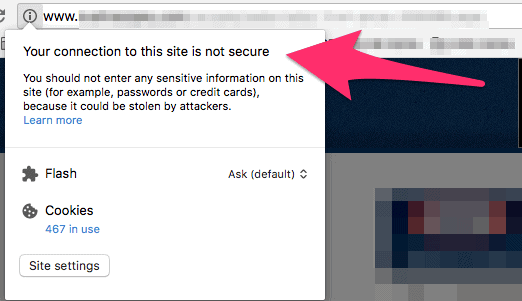
In addition, if Google is favoring secure sites, it’s fair to guess that SSL is becoming an increasingly important consideration for rankings.
We still believe it is a very minor factor though.
So while a few years ago my answer would have been “You really don’t need to bother, it’s just a gimmick”, my answer now would be…”If you can get SSL on your site without too much cost or hassle, then you might as well go for it.”
Some hosts offer one-click installation, or even offer a free SSL if you sign up with them. While it’s not going to be a huge SEO boost, if you can do it in a painless way (really depends on your host and domain registrar), then my advice would be to go ahead and install it.
What about the second question, once you’ve set up SSL, do you need to change all your backlinks?
Not at all.
As long as your SSL is set up correctly, so that the HTTP version of your site redirects to the HTTPS, then your backlinks will also redirect, and the link juice will pass to the SSL version of your site.
This very much depends on you setting up the certificate correctly, but it goes without saying that you should be setting it up correctly in the first place.
Ok, so do free SSL certificates from places like Cloudflare help with SEO?
From what I can tell, no they don’t. The benefit of a free SSL from Cloudflare or elsewhere, is that they allow you to take credit card information on your site and display the “secure” tag.
However, since the certificate won’t be in your site’s name, but rather it will be via Cloudflare, then there won’t be any SEO benefit to your site.
If improving your SEO is your motivation for switching to SSL, you should cough up the $5 per month (or whatever it may be for you) and get a dedicated SSL.
Speaking of which, how do you actually set up SSL?
This part varies based on your host, your domain registrar, and the certificate you’re using. In the case of HPD, we bought the SSL at namecheap, and then contacted our host for help setting it up. It wasn’t as simple as we expected, but this was 2 years ago, when SSL was less noob-friendly.
These days, many hosts offer a one-click install.
My recommendation would be to contact your host and ask them what options they offer.
It’s important to understand that:
a.) If SSL is set up correctly, it will 301 redirect the non SSL (HTTP) version of your site to the SSL (HTTPS) version automatically, and all inner pages will also redirect properly. If this is the case, your rankings shouldn’t be effected in the long term (more on this below).
b.) Using an SSL certificate is applied to an entire server, so if you have multiple sites hosted on the same server and use SSL for one of them, all of those sites will try to use the same certificate, which could cause ranking issues. I would ask your host about this in advance, because many servers are set up differently, especially if you use shared hosting.
Will your rankings suffer when you make the switch?
That would be ironic right? You want to get a ranking boost, make the switch, and then your rankings tank.
I’ve actually seen this happen though. With HPD it happened at first when we made the switch. Google is much better at dealing with this now, and the worst case scenario if you’ve done everything correctly, will be a temporary Google dance, where your rankings may bounce around for a few days or a week while Google indexes the changes.
The main thing to think about is that the redirect is in place, otherwise you’ll end up with both versions of your site indexed, and that WILL cause a ranking issue.
If you have any more questions about HTTPS, then post them below. Or, if it’s on a different topic, post it in our FB Group.
