
UPDATED DECEMBER 2016
At the end of February 2016, I made some changes to one of my Amazon sites in an effort to get more conversions. I decided that the traffic was great, rankings were moving in the right direction, so something needed to be done.
Up until that point, the site had never earned me much more than $100 a month. This is an aged site, started at the beginning of 2013, but didn’t start getting a lot of traffic until recently (as I detailed in this post).
As of writing, that site has now earned me over $350 for the month of March alone. That’s a huge increase (around 300%).

It wasn’t luck either, it was just making some simple changes.
In today’s post, I’m going to show you what changes I made, and how you can make them too.
The Backstory
As you know from one of my recent posts, Amazon affiliate websites are one of the best ways to get started in affiliate marketing. As such, I’m always testing different methods to get them to succeed.
For this particular method, there were basically two parts. 1.) Increase traffic and 2.) Improve conversions. Simple really.
I started increasing traffic at the end of last year when I bought two packages from The Hoth, and build a few other backlinks to the site as well. It took a bit longer than I expected, but the site is now ranking nicely for some of the big keywords, and getting great traffic.
The next step was to improve conversions, and a well-timed guest post that Josh (Formyourfuture.com) did on Jon Haver’s site (which you can read here), gave me what I needed.
In the post, Josh explains how to structure Amazon reviews and “best of” posts, where to put call-to-actions, and also the correct use of comparison charts.
Step One – Recommended Products
Up until this point, my posts were using comparison charts made with TablePress, but it was almost a case of information overload. People were seeing a chart listing all the different products, but they weren’t being told which one was the best.
The first thing I did was to go into Google Analytics and identify the top 10 most visited pages on my site.
Why?
I didn’t want to spend hours making changes if they weren’t going to work, so doing the top 10 first is a good idea.
The second thing I did was to install Thrive Content Editor.
Why?
With thrive, you can create a template “call to action” and load it on all your pages really easily. It’s a drag and drop editor as well, so I was able to basically create a really cool “Recommended Product” box that stood out, stick a call to action in it, then save the template. I then went through every relevant page from the top 10 and added it.
All in all this took me about an hour. Without Thrive it would have taken longer, but I could still have copied and pasted code between pages. The main difference is that thanks to Thrive, the box really stands out, which is more important than you’ll realize initially.

Using the Thrive Content Editor to make beautiful page elements is easy.
I added the “recommended” product box midway down some posts, and near the top on other posts, depending on how I felt they fit in with the flow of the article.
Step Two – “Top 3” Comparison Charts
Some of the posts allowed room to add a mini comparison chart as well, so again using Thrive, I created one and added it to the bottom of the most relevant posts.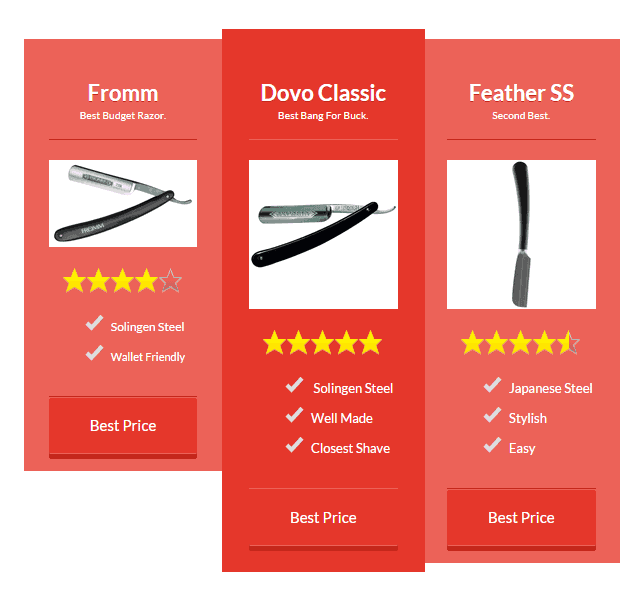
This was also made with Thrive and copied onto several pages. It took about 15 minutes.This was also made with Thrive and copied onto several pages. It took about 15 minutes.
Step Three – Waited
It took me a week to realize that I’d had an instant increase. In fact, for the first few days I wasn’t sure if I was seeing extra conversions or just having a good day.
The first thing I noticed after a few days though was that I was making sales daily. In the past, this site might make 4 sales one day, then 0 for the next few. For March, it was making 10-20 sales most days, and 2 to 3 was the lowest.
This lasted for the entire month.
Now the month has ended and over 20 items are still waiting to ship.
Analyzing The Results
Let’s take a look at what Amazon looked like for this site in Jan, and Feb, then compare it with March.
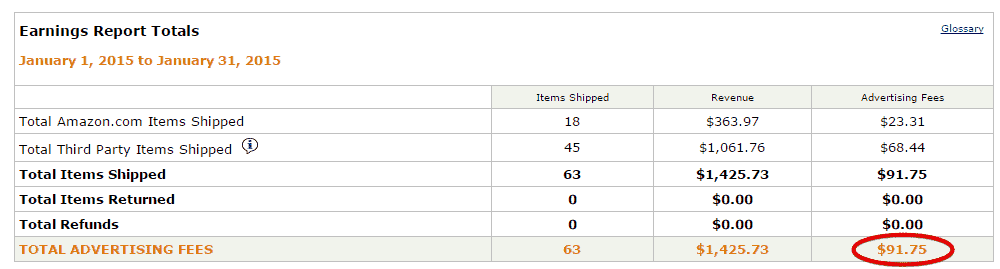


March actually got more than double what I usually get in December, which is typically the biggest month of the year. Can’t wait to December this time around!
What’s also important to note is that this boost isn’t a fluke.
As you’ll know, with Amazon there are those times where you get a one-off purchase of something big that pushes the sales higher than usual. In this case, even though I did have one of those mega purchases, 99% of the sales were exactly what you’d expect from this site. They were all products relevant to the niche.
The site had about 8.32% conversion on Amazon clicks.
Another important thing is that I’d say only 50% of the products sold were ones I had explicitly mentioned, and the other 50% were just relevant.
Thanks to how Amazon sets up its pages, you can often get a sale even if the person doesn’t buy the thing you suggested. As Matt Allen pointed out in the comments on this post, in many cases you only need to get the click.
This is great if you’re in a niche where there are a lot of different products to choose from. Recommend one that you think is good, but don’t be surprised if people buy something else instead. Just enjoy the commission.
So How Did The Changes I Made Work?
I need to do more digging to really know for sure, but here’s what my instincts tell me.
1.) The content boxes I added with Thrive make it much easier to see call to action buttons.
2.) Giving people a specific product to click (read: Tell them which one is best), makes them more likely to click it.
What Next?
Well the site is going well now and I’ve figured out how to get more money out of it, so what am I going to do next?
1.) Add more posts. There are plenty of long-tail keywords that I can add and lots more products to review. Thanks to Amazon, I also know which products are selling the best, and can target them with individual reviews.
2.) Possibly add more links. Hoth did really well and I’m considering adding another batch after more content has gone up. I’ll probably also add some more powerful links as well. If you need more traffic to your Amazon sites (and who doesn’t) I’d recommend checking out The Hoth first, as it’s pretty beginner friendly.
3.) Keep testing conversions. One thing Josh told me to do in an email was install the SumoMe app and add heatmap tracking. This will let you see exactly how people are behaving on your site, where they are clicking, how far they are reading etc. As it happens, I never checked this info because I saw instant conversion growth, but I could probably tweak it even more if I dug deeper.
Conclusion
If you want to recreate this, then it’s best to get it right from the beginning. My team and I have put together hundreds of Amazon niche websites for people now and you can get more information on our niche selection process here.
There’s one thing I’d like to leave you with.
It’s important that once you start getting traffic, you check your most trafficked pages and look at ways you could improve them. Create your commercial content first (or let us do it for you) and then see where the low hanging fruit is.
Thrive Content Builder made the actual improvement easier, but it’s not essential.
Hopefully, you’ll be able to look at some of the changes I made here (which aren’t exactly rocket science) and implement them into your own sites.
